
OPC UA Protocol
OPC UA Protocol
1. Overview
This document describes two independent operational modes for IoTDB's integration with the OPC UA protocol. Choose the mode based on your business scenario:
- Mode 1: Data Subscription Service (IoTDB as OPC UA Server): IoTDB starts an embedded OPC UA server to passively allow external clients (e.g., UAExpert) to connect and subscribe to its internal data. This is the traditional usage.
- Mode 2: Data Push (IoTDB as OPC UA Client): IoTDB acts as a client to actively synchronize data and metadata to one or more independently deployed external OPC UA servers.
Note: This mode is supported starting from V2.0.8.
Note: Modes are mutually exclusive
When the Pipe configuration specifies the node-urls parameter (Mode 2), IoTDB will not start the embedded OPC UA server (Mode 1). These two modes cannot be used simultaneously within the same Pipe.
2. Data Subscription
This mode supports users subscribing to data from IoTDB using the OPC UA protocol, with communication modes supporting both Client/Server and Pub/Sub.
Note: This feature does not involve collecting data from external OPC Servers into IoTDB.
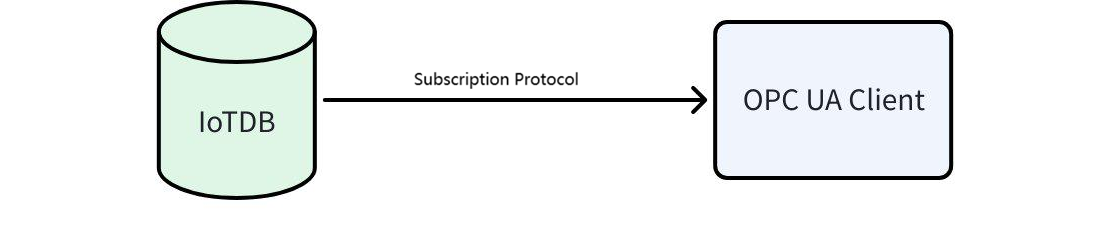
2.1 OPC Service Startup
2.1.1 Syntax
Syntax for starting OPC UA protocol:
CREATE PIPE p1
    WITH SOURCE (...)
    WITH PROCESSOR (...)
    WITH SINK ('sink' = 'opc-ua-sink',
               'sink.opcua.tcp.port' = '12686',
               'sink.opcua.https.port' = '8443',
               'sink.user' = 'root',
               'sink.password' = 'TimechoDB@2021',  // Default password was 'root' before V2.0.6.x
               'sink.opcua.security.dir' = '...'
              )
2.1.2 Parameters
| Parameter | Description | Value Range | Required | Default Value |
|---|---|---|---|---|
| sink | OPC UA SINK | String: opc-ua-sink | Required | |
| sink.opcua.model | OPC UA operational mode | String: client-server / pub-sub | Optional | client-server |
| sink.opcua.tcp.port | OPC UA TCP port | Integer: [0, 65536] | Optional | 12686 |
| sink.opcua.https.port | OPC UA HTTPS port | Integer: [0, 65536] | Optional | 8443 |
| sink.opcua.security.dir | OPC UA key and certificate directory | String: Path (supports absolute/relative paths) | Optional | 1. opc_security folder under IoTDB's DataNode conf directory /. 2. User home directory's iotdb_opc_security folder / if no IoTDB conf directory exists (e.g., when starting DataNode in IDEA) |
| opcua.security-policy | Security policy used for OPC UA connections (case-insensitive). Multiple policies can be configured and separated by commas. After configuring one policy, clients can only connect using that policy. Default implementation supports None and Basic256Sha256. Should be set to a non-None policy by default. None policy is only for debugging (convenient but insecure; not recommended for production). Note: Supported since V2.0.8, only for client-server mode. | String (security level increases):None,Basic128Rsa15,Basic256,Basic256Sha256,Aes128_Sha256_RsaOaep,Aes256_Sha256_RsaPss | Optional | Basic256Sha256,Aes128_Sha256_RsaOaep,Aes256_Sha256_RsaPss |
| sink.opcua.enable-anonymous-access | Whether OPC UA allows anonymous access | Boolean | Optional | true |
| sink.user | User (OPC UA allowed user) | String | Optional | root |
| sink.password | Password (OPC UA allowed password) | String | Optional | TimechoDB@2021 (Default was 'root' before V2.0.6.x) |
| opcua.with-quality | Whether OPC UA publishes data in value + quality mode. When enabled, system processes data as follows:1. Both value and quality present → Push directly to OPC UA Server.2. Only value present → Quality automatically filled as UNCERTAIN (default, configurable).3. Only quality present → Ignore write (no processing).4. Non-value/quality fields present → Ignore data and log warning (configurable log frequency to avoid high-frequency interference).5. Quality type restriction: Only boolean type supported (true = GOOD, false = BAD).Note: Supported since V2.0.8, only for client-server mode | Boolean | Optional | false |
| opcua.value-name | Effective when with-quality = true, specifies the name of the value point. Note: Supported since V2.0.8, only for client-server mode | String | Optional | value |
| opcua.quality-name | Effective when with-quality = true, specifies the name of the quality point. Note: Supported since V2.0.8, only for client-server mode | String | Optional | quality |
| opcua.default-quality | When no quality is provided, specify GOOD/UNCERTAIN/BAD via SQL parameter. Note: Supported since V2.0.8, only for client-server mode | String: GOOD/UNCERTAIN/BAD | Optional | UNCERTAIN |
| opcua.timeout-seconds | Client connection timeout in seconds (effective only when IoTDB acts as client). Note: Supported since V2.0.8, only for client-server mode | Long | Optional | 10L |
2.1.3 Example
CREATE PIPE p1
    WITH SINK ('sink' = 'opc-ua-sink',
               'sink.user' = 'root',
               'sink.password' = 'TimechoDB@2021');  // Default password was 'root' before V2.0.6.x
START PIPE p1;
2.1.4 Usage Restrictions
- Data must be written after protocol startup to establish connection. Only data written after connection can be subscribed.
- Recommended for single-node mode. In distributed mode, each IoTDB DataNode acts as an independent OPC Server; separate subscriptions are required for each.
2.2 Example of Two Communication Modes
2.2.1 Client/Server Mode
In this mode, IoTDB's stream processing engine establishes a connection with the OPC UA Server (Server) via OPC UA Sink. The OPC UA Server maintains data in its address space (Address Space), and IoTDB can request and retrieve this data. Other OPC UA clients (Clients) can also access the server's data.
- Features:
- OPC UA organizes device information received from Sink into folders under Objects folder in tree structure.
- Each point is recorded as a variable node with the latest value in the current database.
- OPC UA cannot delete data or change data type settings.
2.2.1.1 Preparation
- Example using UAExpert client: Download UAExpert client from https://www.unified-automation.com/downloads/opc-ua-clients.html
- Install UAExpert and configure certificate information.
2.2.1.2 Quick Start
2.2.1.2.1 Scenarios Supporting the None Security Policy
- Start OPC UA service using SQL (detailed syntax see IoTDB OPC Server Syntax):
create pipe p1 with sink ('sink'='opc-ua-sink', 'opcua.security-policy'='AES128_SHA256_RSAOAEP, AES256_SHA256_RSAPSS, BASIC256SHA256, NONE');Note: Since version V2.0.8.1, None is no longer supported by default. To use it, you must manually enable it via the security-policy parameter as shown above.
- Write some data:
INSERT INTO root.test.db(time, s2) VALUES(NOW(), 2);Configure UAExpert to connect to IoTDB (password matches
sink.passwordconfigured above, e.g., root/TimechoDB@2021):
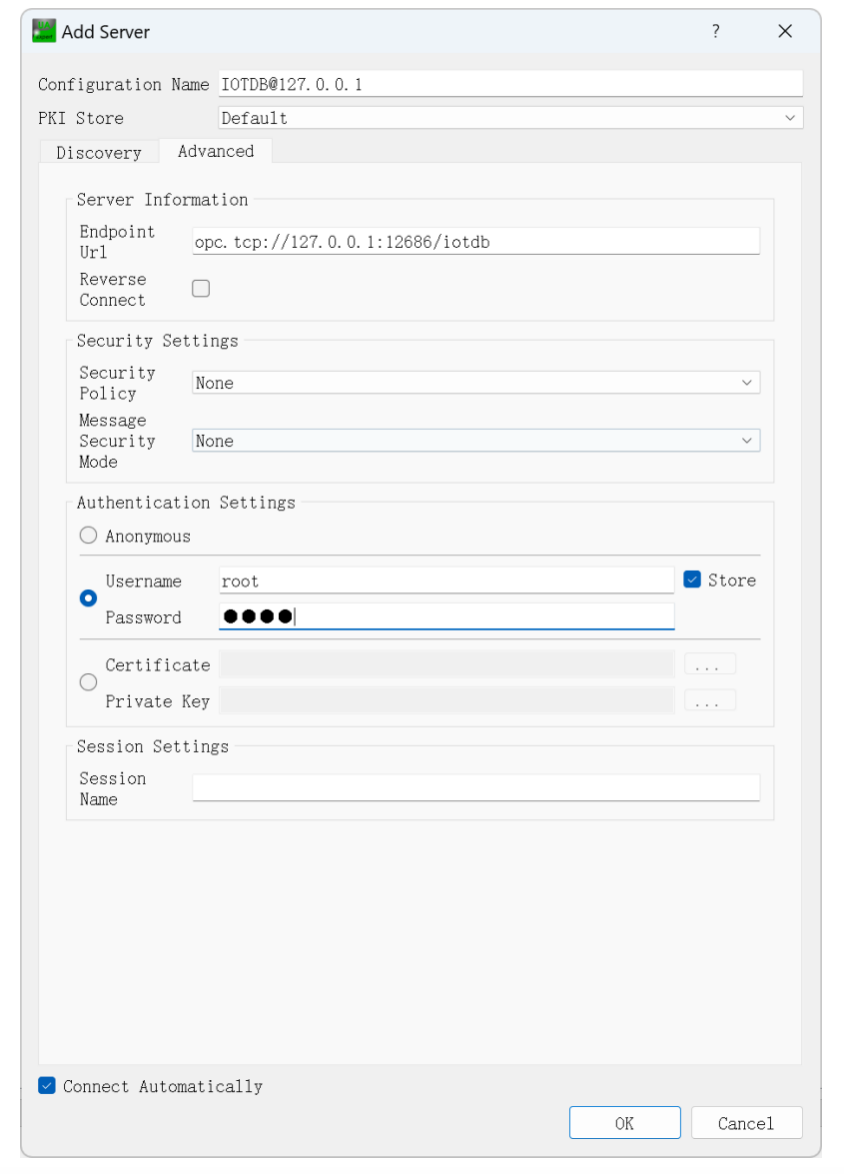
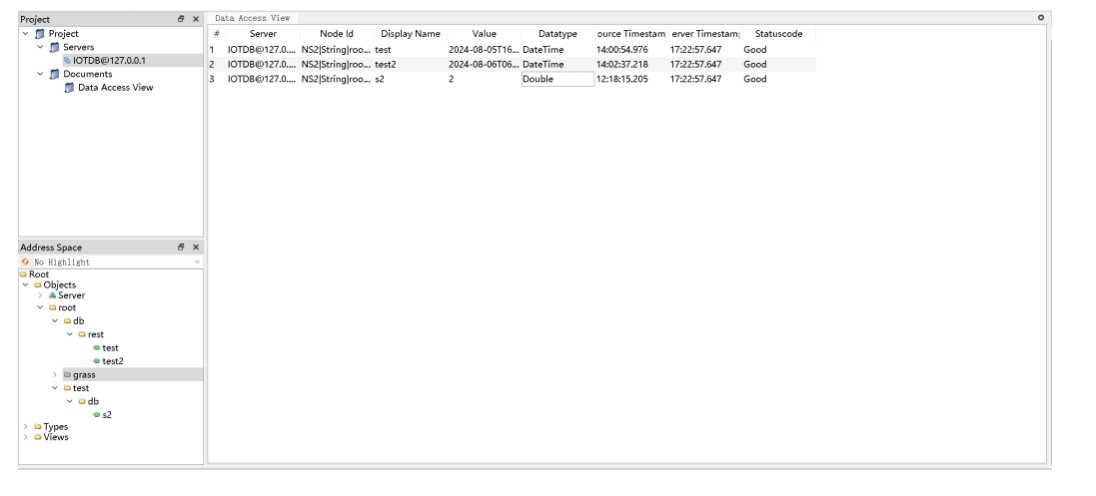
Trust the server certificate, then view written data under Objects folder on the left:
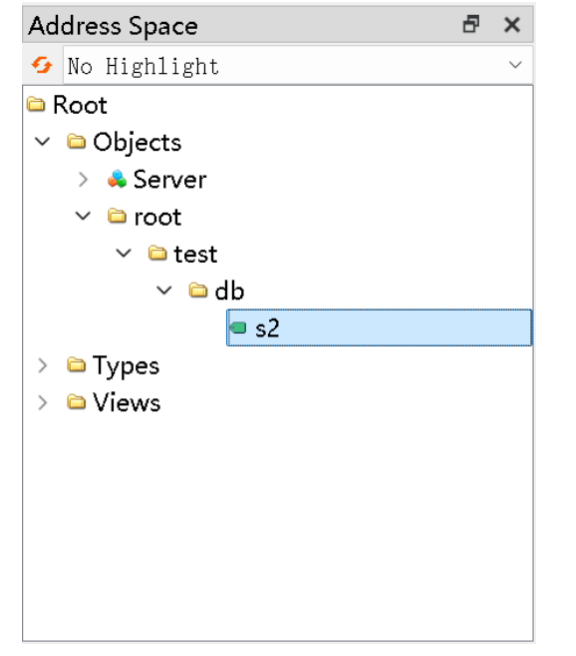
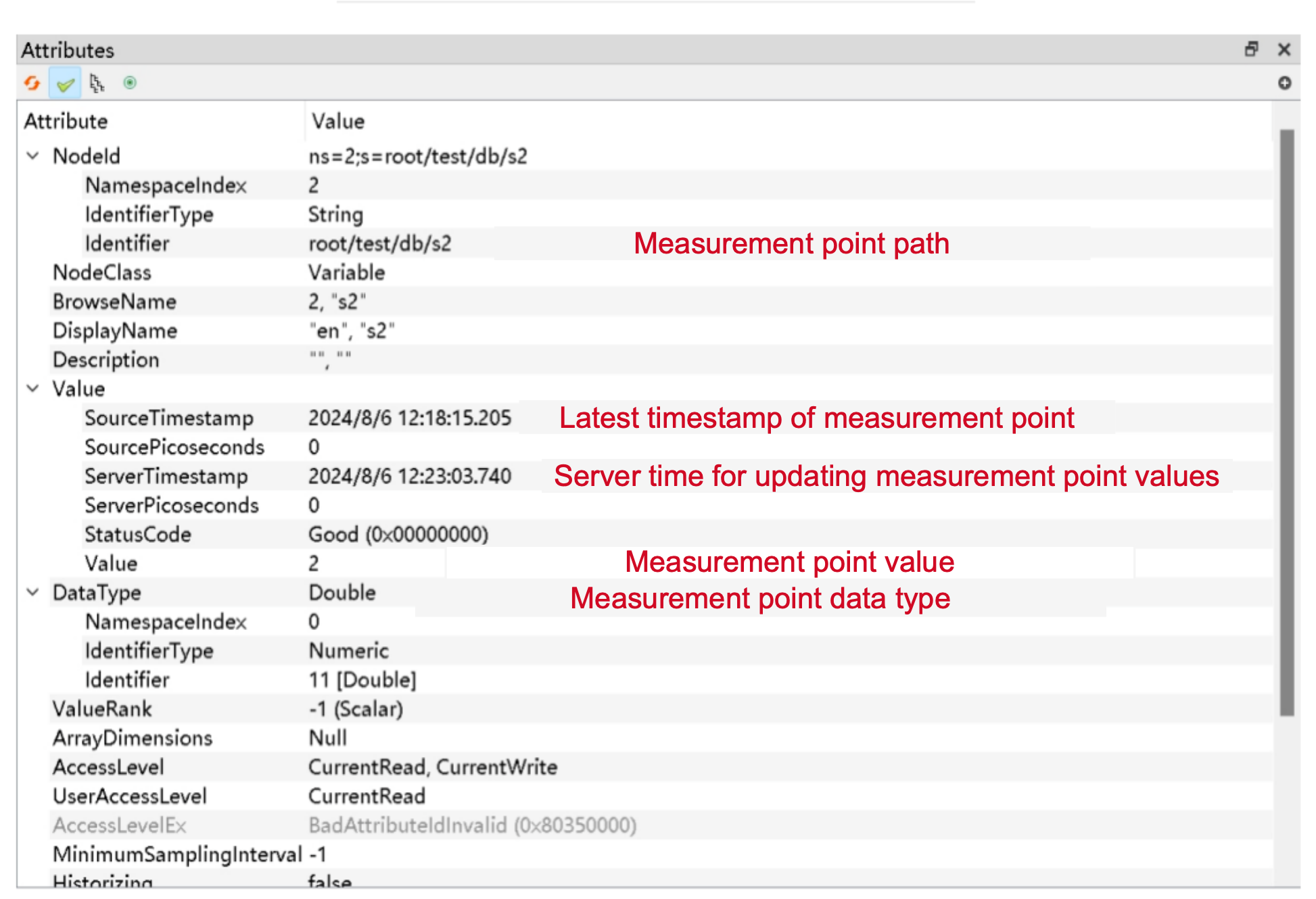
Note: Since the SecurityPolicy is set to None, mutual certificate trust is not required. For production environments, it is recommended to use a non-None SecurityPolicy for connection, which requires mutual certificate trust. For operations, refer to the Pub/Sub mode section below. In the Client/Server certificate directory (search for the keyword keyStore in the printed logs), move the contents in reject to trusted/certs. Follow the sequence: connect → move server directory → connect → move client directory → connect.
Drag left nodes to the middle to display latest value:
2.2.1.2.2 Scenarios Not Supporting the None Security Policy
Use the following SQL to create and start the OPC UA service.
create pipe p1 with sink ('sink'='opc-ua-sink');Note: Since version V2.0.8.1, OpcUaSink no longer supports None mode by default for security considerations.
Insert some test data.
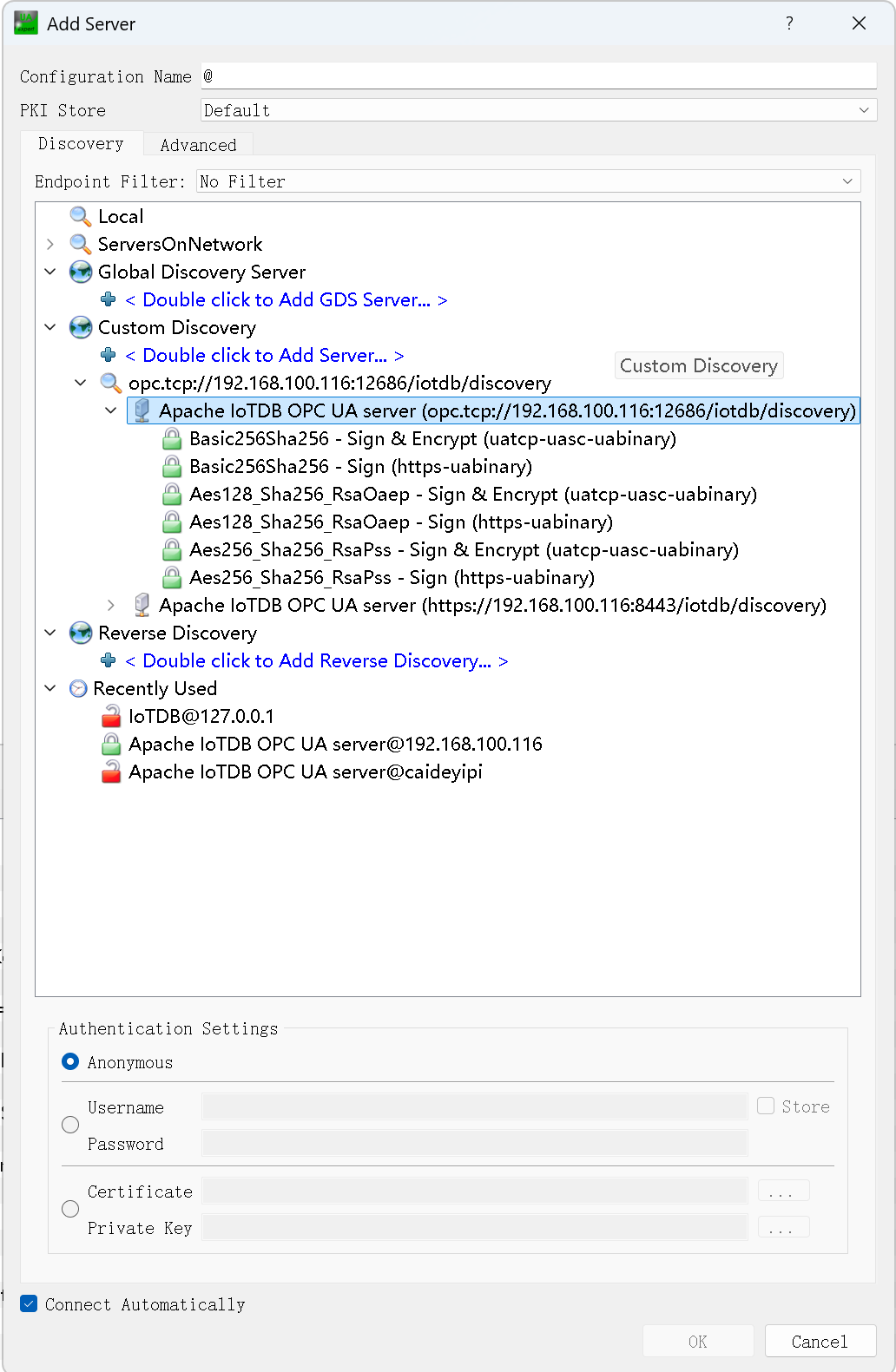
insert into root.test.db(time, s2) values(now(), 2);Configure the IoTDB connection in UAExpert:
- Do not access the URL directly; endpoints must be discovered using the Discover method
- The client first sends a GetEndpoints request with the None policy to retrieve the endpoint list
- It then selects the corresponding encrypted endpoint based on the configured Basic256Sha256 + SignAndEncrypt to establish an encrypted connection
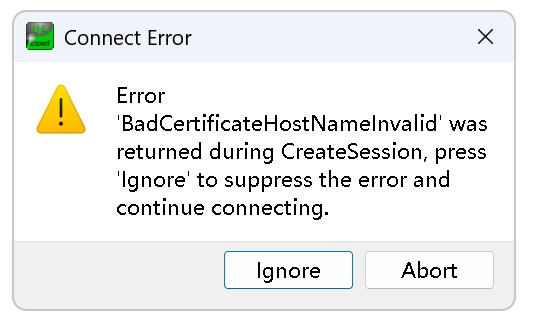
Use the same username and password configuration as above. After selecting the relevant connection mode (Sign / Sign & Encrypt), if the following prompt appears, click Ignore to connect directly.
2.2.2 Pub/Sub Mode
In this mode, IoTDB's stream processing engine sends data change events to the OPC UA Server (Server) via OPC UA Sink. These events are published to the server's message queue and managed via Event Nodes. Other OPC UA clients (Clients) can subscribe to these Event Nodes to receive notifications when data changes.
Features:
Each point is packaged as an Event Node (EventNode) by OPC UA.
Related fields and meanings:
Field Meaning Type (Milo) Example Time Timestamp DateTime 1698907326198 SourceName Full path of point String root.test.opc.sensor0 SourceNode Data type of point NodeId Int32 Message Data LocalizedText 3.0
- Events are sent only to currently subscribed clients. Unconnected clients ignore events.
- Deleted data cannot be pushed to clients.
2.2.2.1 Preparation
Code located in example/pipe-opc-ua-sink/src/main/java/org/apache/iotdb/opcua of iotdb-example package.
Contains:
- Main class (
ClientTest) - Client certificate logic (
IoTDBKeyStoreLoaderClient) - Client configuration and startup logic (
ClientExampleRunner) - Parent class for
ClientTest(ClientExample)
2.2.2.2 Quick Start
- Open IoTDB and write some data:
INSERT INTO root.a.b(time, c, d) VALUES(NOW(), 1, 2); // Auto-creates metadata- Create and start Pub/Sub mode OPC UA Sink:
CREATE PIPE p1 WITH SINK ('sink'='opc-ua-sink', 'sink.opcua.model'='pub-sub');
START PIPE p1;- Observe server creates OPC certificate directory under conf:
- Run Client to connect, but server rejects Client certificate:
- Enter server's
sink.opcua.security.dir→pki→rejecteddirectory, find Client's certificate: - Move Client's certificate (not copy) to
trusted/certsdirectory: - Reopen Client → server certificate rejected by Client:
- Enter client's
<java.io.tmpdir>/client/security→pki→rejected→ move server's certificate (not copy) totrusted: - Open Client → successful bidirectional trust, connection established.
- Write data to server → Client prints received data:
2.2.3 Notes
- Single-node vs Cluster: Recommend single-node (1C1D). In cluster with multiple DataNodes, data may be distributed across nodes, preventing full data subscription.
- No root certificate operations: No need to handle IoTDB's root security directory
iotdb-server.pfxor client security directoryexample-client.pfx. During bidirectional connection, root certificates are exchanged. New certificates are placed inrejecteddirectory; if intrusted/certs, they're trusted. - JDK >= 17 (JDK >= 1.8 before V2.0.11.1): JDK 8 may have key size restrictions causing "Illegal key size" errors. For specific versions (e.g., jdk.1.8u151+), add
Security.setProperty("crypto.policy", "unlimited");inClientExampleRunner.createClient(), or replaceJDK/jre/lib/security/local_policy.jarandUS_export_policy.jarwith unlimited versions from https://www.oracle.com/java/technologies/javase-jce8-downloads.html. - Connection issues: If error is "Unknown host", modify
/etc/hostson IoTDB DataNode machine to add target machine's URL and hostname.
3. Data Push
In this mode, IoTDB acts as an OPC UA client via Pipe to actively push selected data (including quality code) to one or more external OPC UA servers. External servers automatically create directory trees and nodes based on IoTDB's metadata.

3.1 OPC Service Startup
3.1.1 Syntax
Syntax for starting OPC UA protocol:
CREATE PIPE p1
    WITH SOURCE (...)
    WITH PROCESSOR (...)
    WITH SINK ('sink' = 'opc-ua-sink',
               'opcua.node-url' = '127.0.0.1:12686',
               'opcua.historizing' = 'true',
               'opcua.with-quality' = 'true'
              )
3.1.2 Parameters
| Parameter | Description | Value Range | Required | Default Value |
|---|---|---|---|---|
| sink | OPC UA SINK | String: opc-ua-sink | Required | |
| opcua.node-url | Comma-separated OPC UA TCP ports. When specified, IoTDB does not start local server but sends data to configured OPC UA Server. | String | Optional | '' |
| opcua.historizing | When automatically creating directories and leaf nodes, whether to store historical data in new nodes. | Boolean | Optional | false |
| opcua.with-quality | Whether OPC UA publishes data in value + quality mode. When enabled, system processes data as follows:1. Both value and quality present → Push directly to OPC UA Server.2. Only value present → Quality automatically filled as UNCERTAIN (default, configurable).3. Only quality present → Ignore write (no processing).4. Non-value/quality fields present → Ignore data and log warning (configurable log frequency).5. Quality type restriction: Only boolean type supported (true = GOOD, false = BAD). | Boolean | Optional | false |
| opcua.value-name | Effective when with-quality = true, specifies the name of the value point. | String | Optional | value |
| opcua.quality-name | Effective when with-quality = true, specifies the name of the quality point. | String | Optional | quality |
| opcua.default-quality | When no quality is provided, specify GOOD/UNCERTAIN/BAD via SQL parameter. | String: GOOD/UNCERTAIN/BAD | Optional | UNCERTAIN |
| opcua.security-policy | OPC UA client security policy (case-insensitive), URL format: http://opcfoundation.org/UA/SecurityPolicy#, e.g., http://opcfoundation.org/UA/SecurityPolicy#Aes128_Sha256_RsaOaep | String (security level increases):None,Basic128Rsa15,Basic256,Basic256Sha256,Aes128_Sha256_RsaOaep,Aes256_Sha256_RsaPss | Optional | Basic256Sha256 |
| opcua.timeout-seconds | Client connection timeout in seconds (effective only when IoTDB acts as client) | Long | Optional | 10L |
Parameter Naming Note: All parameters support omitting
opcua.prefix (e.g.,node-urlsandopcua.node-urlsare equivalent).Support Note: All
opcua.parameters are supported starting from V2.0.8, and only forclient-servermode.
3.1.3 Example
CREATE PIPE p1
    WITH SOURCE (...)
    WITH PROCESSOR (...)
    WITH SINK ('sink' = 'opc-ua-sink',
               'node-urls' = '127.0.0.1:12686',
               'historizing' = 'true',
               'with-quality' = 'true'
              )
3.1.4 Usage Restrictions
- Current mode only supports
client-servermode and tree model data. - Do not configure multiple DataNodes on one machine to avoid port conflicts.
- Does not support
OBJECTtype data push. - When a time series is renamed, OPC UA Sink automatically deletes the old path and pushes data to the new path.
- Strongly recommended to use non-
Nonesecurity policy (e.g.,Basic256Sha256) with proper bidirectional certificate trust in production.
3.2 External OPC UA Server Project
IoTDB supports a standalone external Server project. This Server implements the same configuration as IoTDB's embedded Server but requires additional support for dynamically creating directories and leaf nodes based on IoTDB's metadata.
Configuration is injected via command-line args when starting the Server (no YAML/XML support). Parameter keys match IoTDB OPC Server configuration items, with dots (.) and hyphens (-) replaced by underscores (_).
Example:
./start-IoTDB-opc-server.sh -enable_anonymous_access true -u root -pw root -https_port 8443Where user and password can be abbreviated as -u and -p. All other parameter keys match configuration items. Note: userName is not a valid parameter key; only user is supported.
3.2.1 Initial Value Loading
Starting from V2.0.10.1, the external OPC UA Server supports connecting to IoTDB during startup and reading the latest value of each time series based on configured tree-model paths. These values are used to initialize node data in the OPC UA namespace. When any IoTDB-related parameter is configured, this capability is enabled automatically. When no IoTDB-related parameter is configured, the external OPC UA Server starts as a normal Server and does not read initial values from IoTDB.
Note: This capability only restores the latest value snapshot queryable at startup. It does not replay historical incremental data. Real-time data generated after startup is still written to the external OPC UA Server through the data push pipeline.
3.2.1.1 IoTDB Startup Parameters
IoTDB-related startup parameters are listed below. When initial latest-value loading is enabled, parameters not explicitly specified use their default values.
| Parameter | Default Value | Description |
|---|---|---|
-iotdb_user | root | IoTDB Session username. |
-iotdb_password | oDB@2021 | IoTDB Session password. |
-iotdb_host | 127.0.0.1 | IoTDB Session address. |
-iotdb_port | 6667 | IoTDB Session port. |
-iotdb_sql_dialect | tree | SQL dialect used for reading. Use tree. |
-iotdb_paths | root.** | Read scope. Multiple paths are separated by commas and only take effect for the tree dialect. |
-iotdb_with_quality | false | Whether to enable the "value + quality" mode. |
-iotdb_value_name | value | Measurement or field name that represents the value when quality mode is enabled. |
-iotdb_quality_name | quality | Measurement or field name that represents the quality bit. |
-iotdb_default_quality | UNCERTAIN | Default OPC status used when the quality bit is missing or unavailable. Valid values are GOOD, UNCERTAIN, and BAD. |
System Properties passed through java -D are listed below:
| System Property | Default Value | Description |
|---|---|---|
opc.initial.fetch.size | 10000 | fetchSize of the IoTDB Session. |
opc.initial.load.batch.size | 10000 | Maximum number of records written to the OPC UA namespace in a single batch. |
Parameter constraints are as follows:
- When
-iotdb_with_quality=false,-iotdb_value_name,-iotdb_quality_name, and-iotdb_default_qualitydo not take effect even if they are specified. - Tree-model
-iotdb_pathsis trimmed and deduplicated. If an empty string or only whitespace is specified, it falls back toroot.**. - If
opc.initial.fetch.sizeoropc.initial.load.batch.sizeis unset, empty, non-numeric, or non-positive, the system uses the default value. Invalid configurations are recorded in warning logs.
3.2.1.2 Startup Examples
Configure the initial loading scope for the tree model through -iotdb_paths:
./start-IoTDB-external-opc-server.sh -enable_anonymous_access true -u root -pw root -iotdb_host 127.0.0.1 -iotdb_port 6667 -iotdb_user root -iotdb_password TimechoDB@2021 -iotdb_sql_dialect tree -iotdb_paths "root.sg.d1.**,root.sg.d2.temperature"When quality mode is enabled for the tree model, the external OPC UA Server reads value measurements and quality measurements based on valueName and qualityName:
./start-IoTDB-external-opc-server.sh -enable_anonymous_access true -u root -pw root -iotdb_host 127.0.0.1 -iotdb_port 6667 -iotdb_sql_dialect tree -iotdb_paths "root.sg.d1.temperature" -iotdb_with_quality true -iotdb_value_name value -iotdb_quality_name quality -iotdb_default_quality UNCERTAIN3.2.1.3 Node Path and Quality Rules
In tree-model mode, the restore scope is determined by -iotdb_paths. The system reads the latest values of matching timeseries from IoTDB according to the configured paths.
| Scenario | Node Path | Corresponding IoTDB Path |
|---|---|---|
| Without quality | root.sg.d1.temperature | root.sg.d1.temperature |
| With quality | root.sg.d1.temperature | root.sg.d1.temperature.value + root.sg.d1.temperature.quality |
When quality mode is enabled for the tree model, the OPC UA node path of a value node is the logical path with the last-level valueName / qualityName removed. A quality record takes effect only when its data type is BOOLEAN: true maps to StatusCode.GOOD, and false maps to StatusCode.BAD. If only a quality record exists without the corresponding value node, the system does not create a node separately.
3.2.1.4 Data Type Mapping
The mapping between IoTDB data types and OPC UA types is shown below. Unsupported types are skipped and recorded in warning logs.
| IoTDB Type | OPC UA Type / Handling |
|---|---|
BOOLEAN | Boolean |
INT32 | Int32 |
DATE | DateTime |
INT64 | Int64 |
TIMESTAMP | DateTime |
FLOAT | Float |
DOUBLE | Double |
TEXT / BLOB / STRING | String |
VECTOR / OBJECT / UNKNOWN | Skipped and recorded in warning logs |
3.2.1.5 Notes
- If the OPC UA node already exists, the existing value is overwritten only when the
sourceTimeof the newly loaded value is later than the current node value. - Quality updates only modify the
statusCodeof existing value nodes and do not change thesourceTimeof value nodes. - Values and quality bits do not have to come from the same record at the same timestamp. The latest result is read independently for each.
- The system reads IoTDB's
timestampPrecision, supportsms,us, andns, and converts the timestamp uniformly toDataValue.sourceTimein OPC UA.
3.3 Scenario Example
Goal: Aggregate data from multiple sources to 3 external OPC Servers for unified monitoring center access.
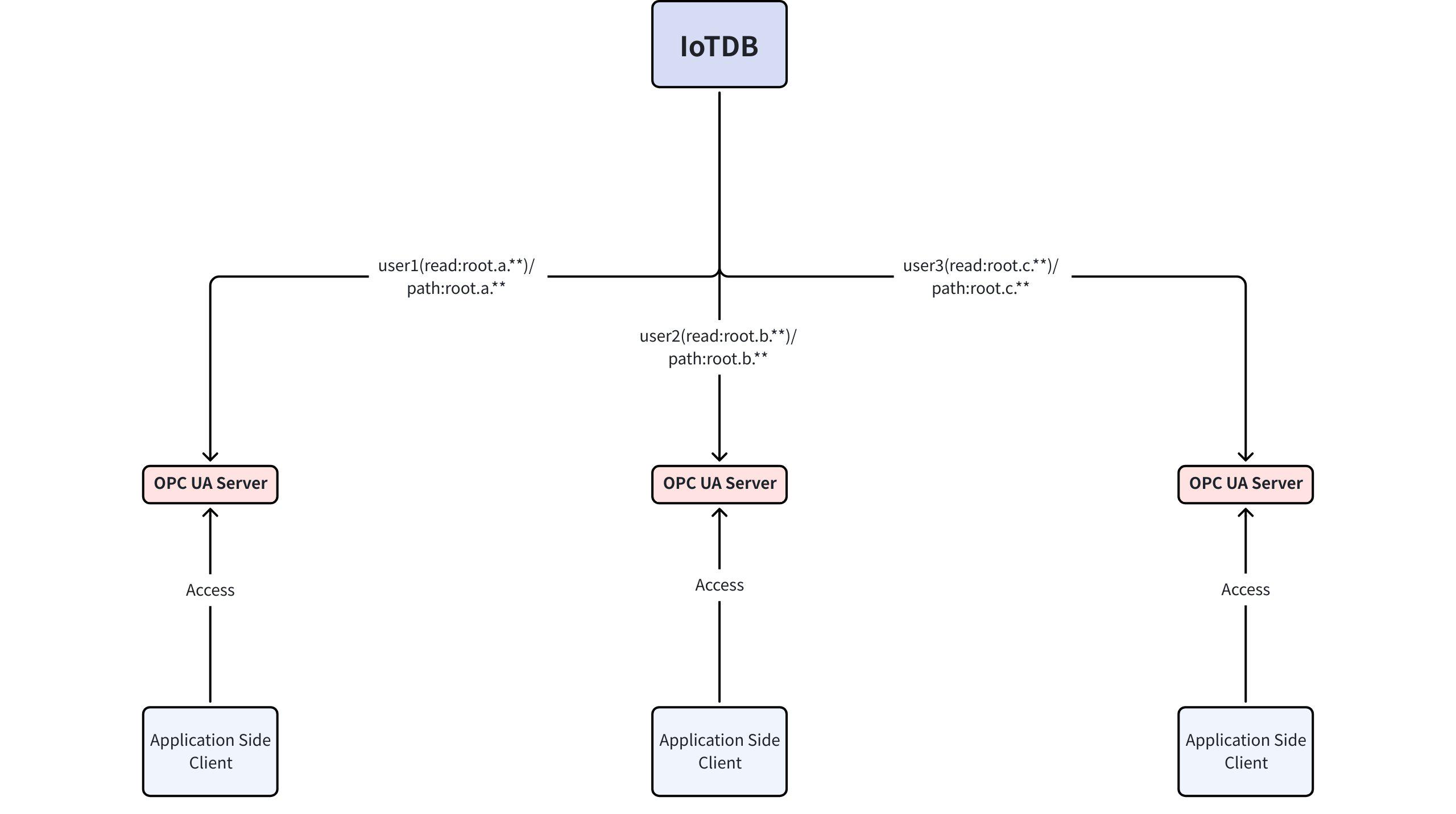
- Preparation: Start external OPC UA Server (port 12686) on three servers (
ip1,ip2,ip3). - Configure Pipes: Create 3 Pipes in IoTDB, using
processororsourcepath patterns to filter data by region and push to corresponding Servers.-- Start IoTDB ./start-standalone.sh -- Start three OPC UA Servers (on ip1, ip2, ip3) ./start-IoTDB-external-opc-server.sh -enable-anonymous-access true -u root -pw root -- Create three Pipes ./start-cli.sh CREATE PIPE p1 WITH SOURCE (<ip1 credentials>) WITH PROCESSOR (...) WITH SINK ('sink' = 'opc-ua-sink', 'node-urls' = 'ip1:12686', 'historizing' = 'true', 'with-quality' = 'true' ); CREATE PIPE p2 WITH SOURCE (<ip2 credentials>) WITH PROCESSOR (...) WITH SINK ('sink' = 'opc-ua-sink', 'node-urls' = 'ip2:12686', 'historizing' = 'true', 'with-quality' = 'true' ); CREATE PIPE p3 WITH SOURCE (<ip3 credentials>) WITH PROCESSOR (...) WITH SINK ('sink' = 'opc-ua-sink', 'node-urls' = 'ip3:12686', 'historizing' = 'true', 'with-quality' = 'true' ); - Result: The monitoring center only needs to connect to
ip1,ip2, andip3to access the complete data view from all regions, with quality information attached.